
gt
An extensible set of tools to simplify git and github repos
version goes here
version goes here
gtis a growing set of cross-platform, command-line tools thsat make it very easy to add, delete, and list repos.
For example, this is how easy it is to create a repo:
  $> gt addRepo myNewRepo
  created the local repository: .
  created the remote public repo: https://github.com/rg3h/myNewRepo
And to delete just the remote repo:
  $> gt delrepo myNewRepo
  ? Type rg3h/myNewRepo to confirm deletion: rg3h/myNewRepo
  ✓ Deleted repository rg3h/myNewRepo
  you may need to delete the local .git repo for myNewRepo
  $> rm -rf .git
And if you try to do something wrong, like try to add an already existing repo:
$> gt addRepo someRepo created the local repository: someRepo created the remote public repo: https://github.com/rg3h/someRepo $> gt addRepo someRepo┌────────────────────────────────────────────────────────────────────┐ │ ⚠ Error: github repo already exists: rg3h/someRepo └────────────────────────────────────────────────────────────────────┘
Description
git creates a local repo in a .git directory. Github provides a remote, cloud-based repository so that local repositories can be backed up off of the local computer and so that it is easier to share work with a team or with the world.But the set of commands, capabilities, and lack of a consistent model make git/github difficult to understand.
gt adopts a simple model, eventually aiming for a Library model where you can check things in and out more fluidly. For now it helps manage entire repos as entities, dealing with them like you deal with directories on your computer. You can:
    gt listRepos  | lr -- list all repos sorted by date, name, public, private
    gt addRepo    | ar -- add a local and remote repo
    gt delRepo    | dr -- delete a remote repo but not the local one
    gt checkInAll | cia -- pull, add all, commit, and push
    gt status     | stat -- lists the status of the local and remote repo
gt also provides --help, error checking, and for delete, confirmation.
gt does this from the command line and uses cross-platform zsh scripts written so that new commands can be added (for example. I'd like to add gt sync to and gt details to get more information about a particular repo).
gt handles a lot of the bureocracy when setting up a local and a remote repo. It will check that the remote repo does not exist, it will let you create it in place (.), use the same name as the remote repo, or let you name the local one differently. You can create public or private repos. gt will initialize the new local repo setting the orgin to the remote. gt issues errors if something won't work, making it really easy to add, list, and delete repos.
This is just the beginning. Eventually a more powerful library model with recipes will later help you sync, check things in and out, undo, see details and visualize your repositories.
The following describes how to install gt and then how each command and zsh works.
Installation
I use gt on my Windows and linux boxes. You will need to install the following apps:- git (you will also need to set up a .gitconfig and .gitignore)
- create a github account
- gh for github
- zsh and sed (on windows I use cygwin)
- download the gt.zip file and unzip it.
- Move the gt directory into your execution path
(like your bin/ directory)
(note for windows you might need to edit your PATH environment variable)
Commands
gt
This is the "umbrella" script that parses the gt commands and sends them to the appropriate module.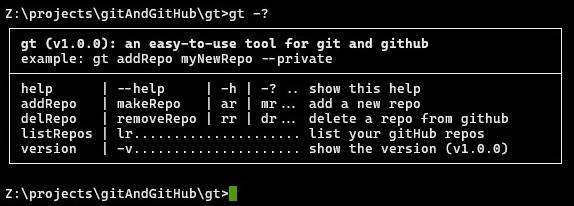
gt listRepos | lr
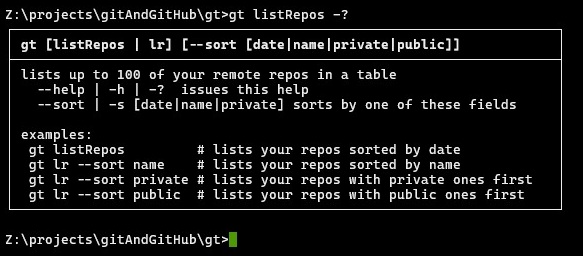
gt listRepos (gt lr) lists all of your repos (up to 100), sorted by date.You can change the sorting order to name or public/private.
gt addRepo | ar
gt addRepo (gt ar) adds a new remote and local repo. By default the repo is public but you can provide a --private option. By default a sub directory named the same as the remote repo is created, but you can also name the local one something different or use "." to create it in the current directory.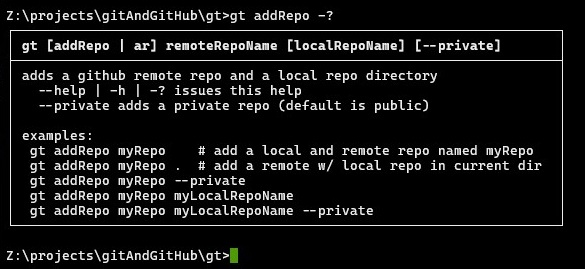
gt delRepo | dr
gt delRepo (gt dr) deletes a remote repo but does not do anything to the local repo (just to be safe. You can rm -rf it). If the remote repo does not exist, gt issues an error message. You can add --yes to skip the confirmation.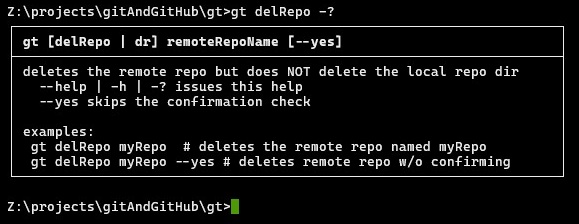
gt checkInAll | cia
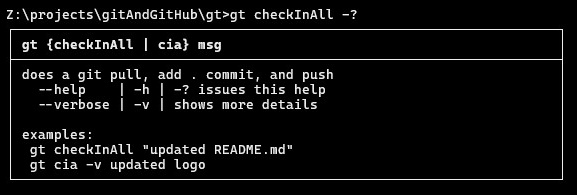
gt checkInAll (gt cia) checks in all of your local code to the repo.It does a pull, then add ., then commit -m "your message", then push.
gt status | stat
gt repouStatus (gt rs) shows the status of the local repo and the remote repo (it is odd that git status does not do this, causing problems when you forget to pull).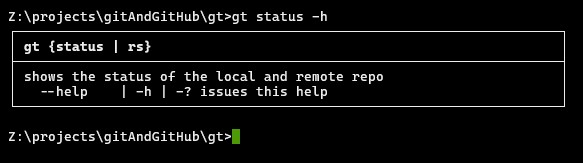
extensible zsh architecture
zsh is a pain. But I've tried to write it so that it is modular. The structure is:
    gt.sh
    gtAddRepo.sh
    gtDelRepo.sh
    gtListRepos.sh
    gtStatus.sh
    modules/
      gtCharCodes.sh   -- TTY character controls to create the ascii boxes
      gtDebug.sh       -- debugging that can be turned on to see details
      gtGetOwner.sh    -- getOwner is a gh command used internally by gt
      gtPrintBox.sh    -- prints the white and red boxes around text
      gtStatusCodes.sh -- the status codes as messages
      gtUtils.sh       -- utility functions
Future Work
There is a healthy TODO list. Generally, there will be a move from zsh to node, which is easier and more powerful, a web version, and a stand-alone app.Additionally a few new modeles for managing repos will evolve:
- purpose-centered: gt for SOLO I, SOLO II, TEAM I, TEAM II
- recipes
- card architecture
- extensions (for example, organizing sets of repos, visualizations)
- integrations (for example, AI, file system management, non-code tools)